Showing posts with label Digital Experience Platform. Show all posts

Monday, 17 November 2025

SitecoreAI Explained Simply: New Features, AI Agents, and What It Means for Marketers

November 17, 2025 0


At Sitecore Symposium 2025, Sitecore introduced the next version of its SaaS-based digital experience platform (DXP), called SitecoreAI. This new platform helps marketers plan, create, and improve campaigns faster with the help of AI. It brings AI-powered personalization, smart automation, and AI-assisted content creation across the whole customer journey.

Main Features of SitecoreAI


1. Strategy

This section includes tools for managing brand guidelines, creating briefs, handling campaigns, and later, a full marketing calendar.

2. Channels

This tab gives access to website and channel management, along with insights related to each channel.

3. Design

Here, users can manage normal website work like page setup, updating components, and maintaining forms.

4. Content

This is for managing content across all channels. It also includes media management (similar to DAM, but full Content Hub support is coming). Soon, it will also help handle embargoed or scheduled content releases—something many CMS tools struggle with.

5. Performance

This tab provides dashboards, insights, and reports to understand how your customer journey is performing.

6. Agentic

This is where Sitecore’s AI vision becomes real. Marketers can subscribe to, customize, or even build their own AI agents.


Agentic Studio: The Core of SitecoreAI

Agentic Studio is the main workspace where marketers work together with AI agents to build digital experiences. It comes with 20 pre-built AI agents, which help automate different tasks such as:

Campaign & Strategy Agents : Help create briefs, find the right audience, and optimize budgets.

Content Production Agents : Create brand-safe content, adapt it for different channels, and keep the messaging consistent.

Migration & Management Agents: These agents can help combine many old websites into one system, saving weeks or months of manual work.

Testing & Optimization Agents : Automate A/B testing, monitor results, and help improve performance.

Marketers can also build their own agents using simple no-code tools.

Key Capabilities of SitecoreAI

1. AI-Driven Content Creation

Helps teams create content faster—such as versions, summaries, metadata, translations, and creative assets.

2. Automated Personalization

AI studies user behavior and delivers the right content automatically, reducing manual work.

3. Better Search Results

With Sitecore Search, AI improves search ranking, understands user queries better, gives recommendations, and reduces zero-result pages.

4. Customer Insights & Predictions

With CDP and Personalize, SitecoreAI improves predictive models, journey insights, and user grouping.

5. AI Agents for Automation

These AI agents can help with:

  • Creating personalized experiences

  • Running optimization tests

  • Finding missing content

  • Suggesting new pages or components

  • Automating marketing workflows

Who Can Use SitecoreAI?

SitecoreAI is available now for:

  • New projects building an AI-first marketing setup

  • Existing XM Cloud customers (no major migration needed)

  • Large, multi-brand enterprises

  • Agencies and Sitecore partners

Why It Matters

For Developers

  • Better APIs and automation tools

  • AI-powered components

  • Faster delivery

  • Less manual personalization rules

For Marketers

  • Create content quickly

  • Launch experiences with AI-based suggestions

  • Personalize without deep technical knowledge

  • Act directly on insights instead of doing manual analysis

Conclusion

SitecoreAI is the start of a new chapter for Sitecore’s digital experience ecosystem.
It is still growing, but the goal is clear: to bring a strong AI layer that makes content creation easier, personalization smarter, and customer journeys more connected.


Friday, 6 June 2025

Building Audience Segment and Setup For XM Cloud Embedded Personalization

June 06, 2025 0


Welcome to my new blog where I'll explore the audience segment building in Sitecore XM Cloud embedded personalization. Here, I'll also explore the wide array of pre-defined condition templates available, giving you a variety of targeting options for easy personalization. In my previous blog I explain on how we can create Page Variants and implement personalization in page variants.

Audience Builder in XM Cloud Personalize

Personalize in XM Cloud enables you to define tailored conditions to target specific audiences and deliver personalized experiences. The Audience Builder offers a user-friendly interface with ready-to-use, pre-defined personalization conditions. These help marketers create personalized experiences effortlessly in a low- or no-code environment.


Mode Selector

Build Mode: Allows us to create or edit your audience while designing a page variant.

Preview Mode: Displays the conditions in an easy-to-read format and shows the order of execution.

Condition Editor

Clicking on “Add first condition” opens a list of pre-defined condition templates in the right pane. We can select templates from this list and add them to the Condition Editor to build your target audience.


Condition Template in Audience Builder

1. Click on "Add First Condition" will open the Condition Template. Here we can select predefine conditions from the list.

2. Search Bar: We can use search bar to find specific condition templates we want to use. The list will display templates with names or descriptions matching your search term.

3. Tags: Use the tag selector to filter condition templates based on specific tags:
  • Date
  • Device
  • Geo
  • Point of sale
  • User interaction
  • Visit
This simplifies the process of finding templates relevant to our target audience's requirements. 

4. Pre-Defined Condition Templates

Condition templates are easy-to-use tools for defining audience segments based on factors like location, device, and website behavior. They help deliver personalized content effortlessly. Each template includes a name, description, configurable variables, and a category. Below are the available pre-defined templates:

Country Region

This personalization is triggered when a user visits from a specific country (e.g., India) and region (e.g., Mumbai). Multiple regions within a country can be selected.


Date and Time (Organization time zone)

This personalization is triggered when a user visit is before or after a specific date and time, based on our organization's time zone.


Time of day (Organization time zone)

This personalization is triggered when a user visit is before or after a specific time, based on our organization's time zone.


Point of Sale

This personalization is triggered for a specific point of sale. Point(s) of sale is a list field where you select name(s) of the point of sale you wish to target.


Region

This personalization is triggered when a user visits from a specific region (e.g., North America). Multiple regions within can be selected.


Country

This personalization is triggered when a user visits from a specific country (e.g., India). Multiple countries can be selected.


Visit day of the month (organization time zone)

This personalization is triggered when a user visit on a specific day of a month, based on our organization's time zone.


Visit day of the week (organization time zone)

This personalization is triggered when a user visit on a specific day(s) of a week, based on our organization's time zone.


Month of visit (organization time zone)

This personalization is triggered when a user visit on a specific month(s), based on our organization's time zone.


UTM Value

This personalization is triggered when a specific UTM parameter matches a defined value—for example, campaign equals "Early Birds Promo." Supported fields include campaign, source, medium, and content. UTM values can contain letters, numbers, and special characters.


First Referrer

This personalization is triggered when the visitor’s first referrer URL matches a specified value, such as https://www.google.com . The referrer is a free-text field that supports letters, numbers, and special characters.


Operating System

This personalization is triggered when a user visits from a specific operating system.
Operating systems include: macOS, Windows, Android, iOS, Linux OS, Other. If the user agent is null or undefined, this condition returns false (even if Other is selected).


Device

This personalization is triggered when a user visits from a specific device type. Multiple countries can be selected. Device types include: mobile, desktop, tablet, other.


First Page

This personalization is triggered when the visitor starts their session on a specific page (e.g., a landing page). The page field accepts free-text input with letters, numbers, and special characters. Only one page can be specified.


Number of Page Views

This personalization is triggered when the visitor has viewed a specific page a certain number of times within a defined period (up to 30 days). The page field accepts free-text input with letters, numbers, and special characters. Only one page can be specified. The visit count can be any whole number, including zero.


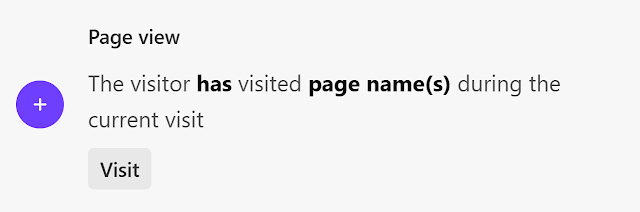
Page view

This personalization is triggered when the visitor has viewed a specific page. The page name field accepts free-text input with letters, numbers, and special characters. Multiple pages can be specified.


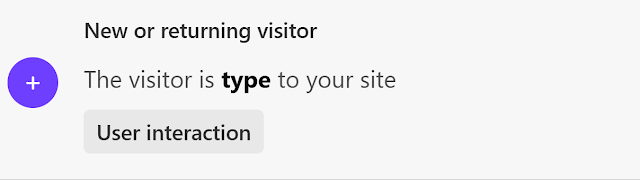
New or Returning Visitor

 This personalization is triggered when the visitor is a specific type. Visitor type can be new or returning.


Variables for Condition Templates


After adding a condition template to an audience, we must define its details using input options, also known as variables.


Depending on the selected condition template, available variables may include:

  • Boolean options: is / is not, has / has not
  • Free text: Letters, numbers, and special characters
  • Predefined lists: Point of sale, country, region, day of week, month, UTM type, device type, operating system, visitor type
  • Comparison operators: is equal to, greater than, less than, greater than or equal to, less than or equal to, in between, include any of, contains, starts with, ends with, is null
  • Spin button values: Ranges from 0–30 or any positive/negative number
We hope this blog helps you fine-tune your audience building and targeting using condition templates. By leveraging the various variables in each template, you can improve the accuracy of reaching your target audience.